Troubleshooting the Maxwatt MX8000IS Generator
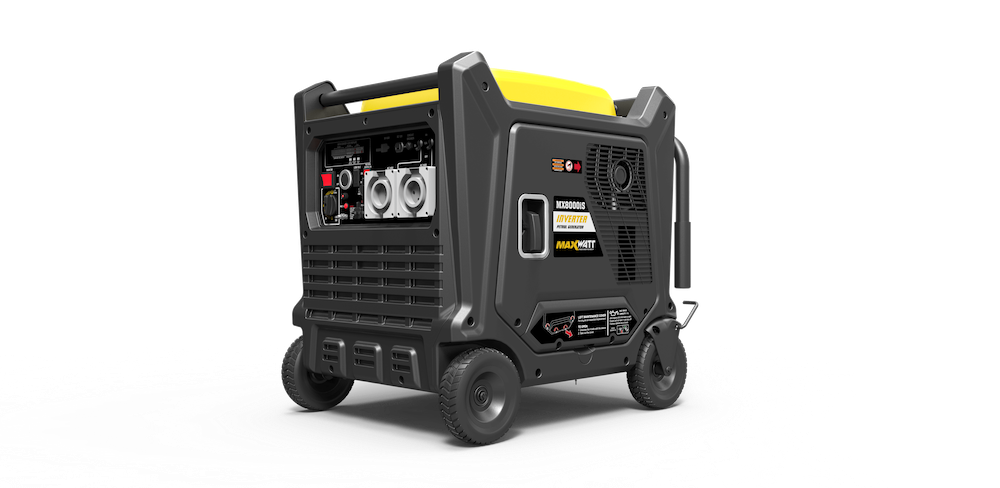
Maxwatt MX8000IS — Support & Troubleshooting
8,000W electric start digital inverter generator. Most common faults can be resolved in a few minutes using the steps below — please work through this guide before contacting us or booking a service.
⚠ Read this before you start
- Running a combustion engine in a confined area can kill in minutes. Exhaust fumes contain carbon monoxide — a deadly gas you cannot see or smell. Never run the generator indoors or in an enclosed space, even with doors and windows open. Operate outdoors only, away from doors, windows and vents.
- Petrol is highly flammable. Stop the engine and let it cool before refuelling. Keep the generator clear of naked flames and other ignition sources when refuelling or servicing.
- The generator may not be supplied with engine oil. The correct type and amount of engine oil must be added before first use. If your Maxwatt generator was supplied by OFFGRID NOW, this will have been completed prior to installation. Running the engine without oil will void your warranty.
- Do not run the engine during inspection or maintenance unless a step specifically requires it, and let the engine cool enough to touch first.
- Know your limits. Do not attempt any procedure you aren't comfortable with or don't have the correct tools, experience or knowledge for. Take the unit to an authorised service centre or qualified technician instead.
Quick checks before you do anything else
Run through this list first. It resolves the majority of "won't start" calls.
- The battery is charged.
- There is enough fuel in the tank, and the fuel is fresh.
- The engine oil is at the correct level and does not need replacing.
- The spark plug is clean, correctly gapped, and does not need replacing.
- The generator has been serviced if it has run for more than 50 hours. Check your owner's manual for the service schedule.
Quick specifications
| Engine type | 4-stroke petrol, 459 cc, digital inverter |
| Fuel type | Fresh unleaded petrol |
| Engine oil type | SAE 10W-30 automotive engine oil recommended for general use — refer to your owner's manual |
| Engine oil capacity | Refer to your owner's manual — always check the level with the dipstick |
| Rated / max power | 7,000 W rated, 8,000 W maximum |
| AC output | 240 V, 50 Hz, 29.2 A |
| Outlets | 1 × 15 A IP66, 1 × 32 A IP66 |
| Starting method | Recoil / electric start / remote control / 2-wire auto start |
| Battery | 12 V 14 Ah lead acid |
| Engine speed | Variable (inverter — engine speed adjusts to load) |
| Fuel tank | 26 L |
| Run time | Approx. 6 hours at 100% load / 11 hours at 50% load |
| Noise level | 68 dB |
| Dimensions / weight | 770 × 610 × 730 mm / 105 kg |
Troubleshooting
The engine will not start
| Possible fault | What to do |
|---|---|
| Engine switch is off | Turn the engine switch to the ON position. |
| No fuel | Fill the fuel tank with fresh unleaded petrol. |
| Fuel switch is off | Turn the fuel switch to the ON position. |
| Dirty fuel filter | Replace the fuel filter, or contact a qualified service centre. |
| Spark plug faulty, fouled or incorrectly gapped | Clean, re-gap or replace the spark plug. |
| Stale fuel, or fuel stored without treating or draining | Drain the fuel and refuel with fresh petrol. If the problem continues, contact a qualified service centre. |
| Water in the fuel | Drain the entire fuel system and refill with fresh fuel. |
| Engine oil level is low | The engine is fitted with a low oil shutoff. If the oil level is low, the unit will not start until it is topped up. Check the oil level and fill if necessary. |
| Battery not charged | Charge the battery. A weak battery is the most common cause of slow or failed cranking on electric start models. Check the terminals are clean and firmly connected. |
The engine lacks power
| Possible fault | What to do |
|---|---|
| Dirty air filter | Check the air filter element. Clean or replace it as needed. |
The generator runs, but an outlet isn't delivering power
| Possible fault | What to do |
|---|---|
| OUTPUT indicator is off and the OVERLOAD indicator is on | The generator is overloaded. Check the AC load and disconnect equipment, check the cooling air inlet is clear, then stop and restart the engine. Reconnect one device at a time and confirm the OUTPUT indicator stays on. |
| AC circuit protector tripped | Remove the load, then reset the AC circuit protector. Repeated tripping points to a faulty appliance or an overloaded circuit. |
| RCD / GFCI system activated | Reset the RCD. |
| The item plugged in is defective | Try a different appliance to confirm whether the fault is with the generator or the equipment. |
If the problem persists after trying the solutions above, contact your nearest authorised service centre for assistance.
Servicing and maintenance
Keep a written record of every service: the date, the machine's running hours, and the work performed. Accurate records help the generator last longer, make fault diagnosis faster, and can simplify a warranty claim.
- Check engine oil and fuel levels before every use.
- Inspect the unit for loose, broken, damaged or missing parts, wear, or leaks before every use. Never run a generator in that condition.
- Service the generator once it has run for more than 50 hours.
- Always use genuine Maxwatt spare parts — non-genuine parts will void your warranty.
Checklist: before sending the generator in for assessment or repair
Working through this list first can save you a trip. Many units sent in for repair are found to have one of these issues.
- ✔ The battery is charged.
- ✔ The oil is at the correct level and doesn't need replacing.
- ✔ There is sufficient fuel in the tank.
- ✔ The spark plug doesn't need cleaning or replacing.
- ✔ The generator has been serviced if it has run for more than 50 hours.
- ✔ You've checked the owner's/operator's manual for guidance on the fault.
- ✔ You have a copy of your proof of purchase.
Warranty
Maxwatt Power Products Pty Ltd warrants that this product will be free from defects in materials or workmanship for:
| Use | Warranty period (whichever comes first) |
|---|---|
| Domestic use Personal, residential household or recreational | 2 years or 500 operating hours |
| Commercial use Income-producing, rental or other business use | 2 years or 300 operating hours |
Goods sold to a customer with an Australian Business Number are treated as being used in a commercial application. The warranty period runs continuously from the date of original sale and does not restart when the product or any part of it is repaired or replaced.
This is a walk-in warranty: the customer returns the generator to the store, with transport charges paid by the customer. If the fault is assessed as a manufacturing defect, the repair is carried out at no charge. Approximate lead time for repairs is 14–21 working days from the date the generator is received at the Maxwatt Service Centre.
What is not covered
- Neglect of the periodic maintenance specified in the owner's manual.
- Improper repairs or maintenance, including any work carried out by a non-accredited service agent.
- Operating methods other than those set out in the owner's manual.
- Use of non-genuine parts or accessories.
- Normal wear and tear, including fading of painted or plated surfaces.
- Consumable parts, including keys, spark plugs, fuel and oil filters, recoil starter ropes, wheels, lubricants, oil, grease and fuel.
- Cleaning, adjustments and routine periodic maintenance — including cleaning the battery, carburettor, engine oil, fuel tank and injectors.
- Overloading that damages the circuit breaker, stator, rotor, inverter or alternator.
- Incorrect installation resulting in damage to the inverter, alternator, control panel or remote.
- Charging and correct maintenance of the battery.
- Failure to carry out first-use preparation as set out in the owner's manual.
- Fire damage, including from overloading, incorrect installation or incorrect refuelling.
- Damage to any electrical or electronic appliances connected to the generator.
Note: an "out of box failure" refers to a machine that has run for less than 20 minutes.
The benefits given by this warranty are in addition to your rights and remedies under the Australian Consumer Law and any other applicable laws. This warranty does not exclude, restrict or modify those rights. Maxwatt Power Products does not accept responsibility for loss of time or use of the product, transportation costs, commercial loss, or any other incidental or consequential loss or damage.
Spare parts, servicing and contact
Maxwatt Power Products carry a full range of genuine spare parts. If the steps above haven't resolved your issue, get in touch for after-sales support.
Maxwatt Power Products Pty Ltd
Unit 15/16, 1440 New Cleveland Road, Chandler QLD 4155
Phone: (07) 3732 5363
Email: customercare@maxwatt.com.au
Web: www.maxwatt.com.au